ComicScreen - PDF, ComicReader
- 4.7
- Rating
- 5.00M
- Installs
- Free
- Price

 Analysis by App-foxy
I spend a lot of time reading comics and illustrated documents on a phone, so I quickly notice when a reader is designed around ordinary pages rather than scanned, image-heavy files. ComicScreen - PDF, ComicReader, developed by InstSoft, takes the latter approach. It is a free comics app for Android that also handles PDF documents and common compressed comic archives, making it useful for anyone whose library is made up of downloaded issues, manga, graphic novels, or image collections.
My first impression is that this is a practical tool rather than a social reading service. It does not try to sell me a catalog, subscriptions, recommendations, or a community. Instead, it focuses on the files already stored on my device. That narrow purpose is a strength: when I want to open a comic quickly, browse a folder, and read without creating an account, the app feels direct. It is also the reason some readers may prefer a different option, especially if they expect cloud syncing, a polished storefront, or a broad set of reading statistics.
How ComicScreen fits into everyday reading
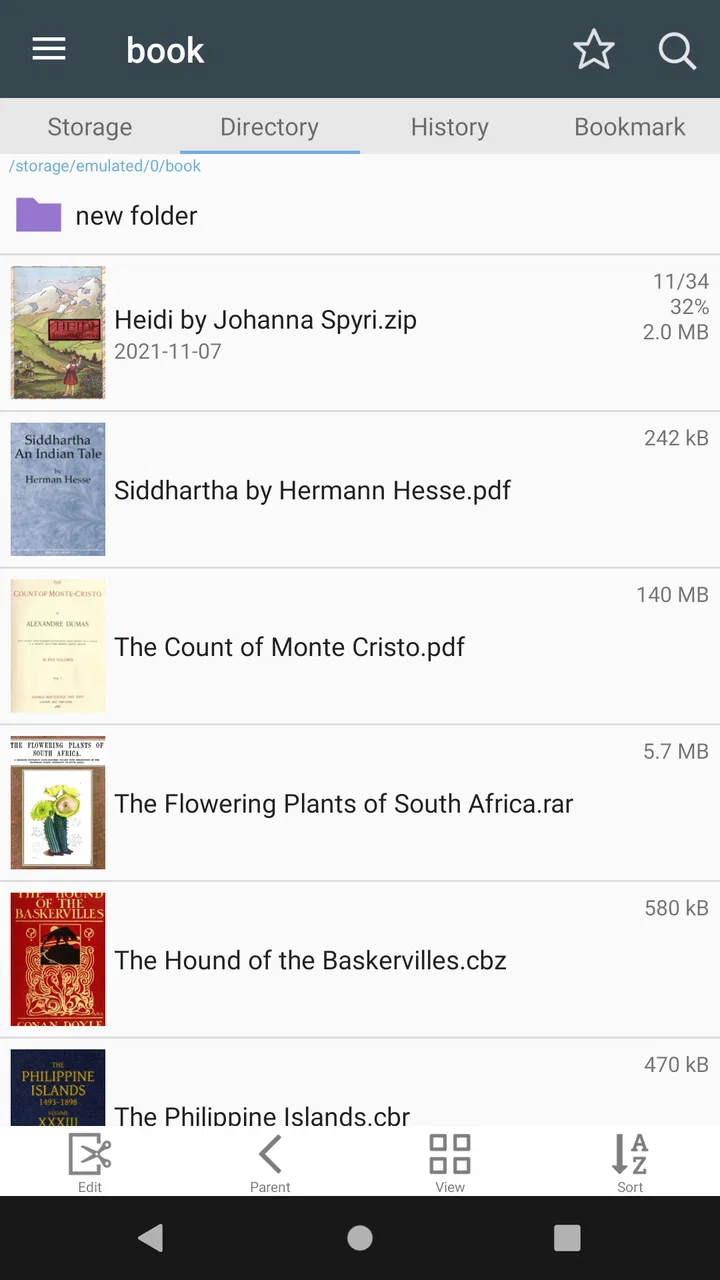
The app belongs to the comics category, but its real identity is closer to a file-based viewer built for pages. It can display comics and pictures from compressed CBR archives as well as PDF files, so I can keep different parts of a personal collection in their existing formats instead of converting everything first. That matters when a library has grown over time from several sources and contains a mixture of scanned books, folders of images, and documents.
You May Also Like

 AccuWeather: Weather Radar
AccuWeather Review: A Quick, Clear Forecast for Everyday Decisions
For everyday plans, the best forecast is the one you can understand quickly. AccuWeather makes rain timing, radar, and local conditions easy to act on, with a few trade-offs.

 Hill Climb Racing
Why Hill Climb Racing Still Turns Crashes Into One More Run
A tiny car, a bumpy hill and one more upgrade: Hill Climb Racing keeps resurfacing because its simple chaos makes every near-miss feel personal.

 AliExpress - Shopping App
AliExpress Makes Global Shopping Feel Personal, but Shoppers Bear the Risk
AliExpress turns a global marketplace into a pocket-sized discovery engine. Its reach is useful, its shopping loop compelling, and its trade-offs easy to miss.

 Lords Mobile: Kingdom Wars
Lords Mobile Is a Kingdom-Building Routine, Not a Quick Match
A case-by-case verdict on the building, battles, device demands, and social commitments that make Lords Mobile rewarding for some players and exhausting for others.

 PDF Scanner app - TapScanner
TapScanner Makes Paperwork Easier to Capture, Check, and Share
TapScanner makes scanning with a phone feel less like a rescue operation and more like a dependable step in getting work done. Its capture tools are useful, though not flawless.

 Block Blast!
 Shows How Much a Puzzle Game Can Leave Out
A quiet grid game shows why puzzle players increasingly value instant clarity, repeatable skill and low-pressure play—and where the genre still needs to catch up.
More From Our News Desk
View All News


A realistic use case is reading during a commute or while waiting for an appointment. I can place a few files on the phone, open the reader, and continue from the local collection without depending on a web catalog. A PDF graphic novel and a compressed comic archive can sit beside each other in the same general workflow. For people who manage their own files, that is more convenient than an app that only displays purchases made inside its own ecosystem.
The interface is best understood as a working shelf for local content. The important question is not whether it looks like a magazine store, but whether it helps me locate a file and get into the pages with little friction. That makes it particularly suitable for readers who already know where their comics are stored. Someone starting with no files, however, may find the experience less welcoming than a subscription reader that supplies content immediately.
InstSoft has kept the app available as a free download, with optional purchases priced from $1.99 to $2.99 per item. That gives curious readers a low-risk way to test the basic workflow before deciding whether the extra purchases are worthwhile. I would still check the purchase screen carefully before confirming anything, because the most important value question is whether those optional items solve a problem I actually have.
Opening files without rebuilding a library
One of the most useful qualities here is the emphasis on existing files. If I have a comic archive saved in compressed form, I do not need to unpack every page manually just to read it. The same applies to a PDF collection: the reader can treat the document as a comic-style reading experience rather than forcing me to use a general office viewer.
This is also where file organization becomes important. I get better results when I keep series, volumes, and one-shot material in clearly named folders before opening the app. A reader built around local files cannot compensate for a chaotic storage layout. The small amount of preparation pays off later, especially when I have several editions with similar cover images.
A tip I found useful is to think of the app as the reading end of a two-step workflow. First, I organize or transfer the files using the phone’s normal file tools. Then I use ComicScreen for navigation and page display. Trying to make the reader perform every file-management task can feel slower than separating those jobs. This approach also makes it easier to back up a collection or move selected books between devices.
Why compressed comic archives matter
CBR support is more than a technical footnote for serious comic readers. Many digital comics are distributed as page images inside compressed archives, and opening those archives directly avoids an unnecessary extraction stage. For a personal collection, that means fewer duplicate folders and less manual cleanup after a reading session.
There is a trade-off. A compressed archive is convenient to store, but it can be less transparent than a folder of individual images when I need to replace one damaged page or inspect the contents. The app makes the archive readable; it does not remove the need for sensible file management. If I regularly edit page order, rename images, or prepare files for other software, a dedicated archive or file utility may still be the better companion.
I also pay attention to naming. A clean sequence of page filenames helps prevent confusion when a book contains extras, covers, or advertisements. This is not a glamorous feature, but it is one of the practical details that separates a smooth local-reading setup from a frustrating one. The app is most comfortable when the files themselves are reasonably prepared.
Reading PDFs as comics rather than office documents
PDF support broadens the audience beyond people who use CBR files. A PDF can be a scanned comic, a collected edition, an art book, or a picture-heavy document. In a general PDF viewer, I often have to work around menus and document-oriented controls. A comics reader makes more sense when the main task is moving through pages visually.
That does not mean every PDF will feel equally good. Text-first documents are usually better served by a dedicated document reader, particularly when I need search, annotations, form tools, or precise text selection. ComicScreen makes more sense when the page itself is the content. This distinction is important: the app is not a replacement for every PDF utility simply because it can open PDF files.
For scanned material, I prefer to zoom only when necessary and then return to a comfortable page view. Repeatedly enlarging and shrinking can make a phone-sized screen tiring, especially on pages with small lettering. The app’s value is greatest when the source has been prepared at a sensible resolution and the reader can follow the artwork without constant adjustment.
What the current version suggests
The current version is 2293, and that number shows that this is an established application rather than a newly assembled experiment. Its release history reaches back to June 3, 2014, so the product has had time to remain focused on its original job: handling comics, pictures, and documents stored as files. I see that longevity as useful evidence of continuity, although it should not be confused with proof that every modern reading expectation has been addressed.
For existing users, a long-running version line can be reassuring because it suggests the app has not been abandoned after a short trial. It also means that expectations should be realistic. A mature utility may prioritize dependable file opening and page navigation over dramatic redesigns. I would judge it by whether those core tasks remain comfortable on my device, rather than expecting it to resemble a newly launched subscription platform.
Its audience size supports that impression. ComicScreen has passed one million installs, with an average rating of 4.7 from around eighty-eight thousand ratings and roughly one thousand six hundred written reviews. Those figures indicate broad interest and strong overall satisfaction, but they do not remove the need to test the app against a personal collection. File formats, page layouts, and reading habits vary too much for a rating alone to answer every compatibility question.
How it compares with the usual alternatives
Compared with a subscription comics service, this app gives me more control over my own files and less access to a ready-made catalog. That is the central trade-off. A subscription platform is better when I want discovery, licensed content, synchronized reading, and a polished account-based library. ComicScreen is better when the files are already mine and I want a straightforward local reader.
Compared with a general PDF application, it is more naturally suited to image-led pages. A document viewer may offer stronger text tools, annotation, search, or integration with office workflows. If I am reviewing contracts or studying a text-heavy manual, I would choose the general PDF tool. If I am moving through scanned comic pages, the specialized focus is more appropriate.
Compared with a basic gallery app, ComicScreen understands that a sequence of images is a book rather than a pile of unrelated pictures. A gallery can be useful for quick image checks, but it usually makes me manage page order and folders more directly. The comics-focused workflow reduces that mismatch, particularly for archives that were packaged for reading rather than casual viewing.
There is also a difference from cloud-first readers. Local storage gives me more independence from network availability and account changes, but it places responsibility for backups and transfers on me. I would not rely on the phone as the only copy of a valuable collection. The best setup is to keep an original archive somewhere safe and use the device as a convenient reading copy.
Small workflow choices that improve the experience
I recommend starting with a small sample rather than importing an entire collection at once. One CBR file, one PDF, and one image-heavy folder are enough to reveal whether the navigation style suits me. This also makes it easier to identify problems in the files themselves instead of assuming the whole library is incompatible.
For long books, I keep series order visible in filenames or folders. That sounds obvious, but local readers cannot provide the same automatic metadata as a storefront. A simple structure such as series name, volume, and reading position is more reliable than trying to remember which cover belongs next.
Another useful habit is to separate reading files from working files. I keep clean archives for reading and place material that still needs renaming, cropping, or page repair in a different folder. This prevents half-finished files from cluttering the reading shelf and reduces the chance of opening the wrong edition during a quick session.
When storage is limited, I transfer only the books I expect to read soon and keep the larger collection elsewhere. The app’s local-file approach is convenient, but it does not turn a phone into unlimited archival storage. This is especially relevant for image-heavy books, which can occupy considerably more space than ordinary text documents.
Where the app may frustrate me
The main limitation is the same feature that makes ComicScreen appealing: it expects me to bring my own content. Readers who want recommendations, automatic purchases, cloud shelves, or a unified reading history may find the experience too hands-on. The app can display a collection, but it is not the same thing as managing a commercial comics library.
File preparation can also become a source of friction. Poorly named pages, unusual archive structures, oversized scans, or documents designed for a very different screen may require extra work. That is not necessarily a failure of the reader, but it affects the total experience. The app is strongest when I value control and am willing to spend a little time keeping the collection orderly.
The free model is approachable, yet optional purchases mean that I should consider the complete cost of the features I want rather than assuming every capability is included. Since the individual items range from $1.99 to $2.99, the decision is fairly easy to frame: try the base experience, identify a specific limitation, and only then consider an in-app purchase that addresses it.
Another consideration is screen size. A phone is convenient for carrying a collection, but double-page layouts and tiny lettering can be uncomfortable. On a larger device, the same files may be much easier to enjoy. I would not reject the app because of that; I would recognize that the display is part of the reading setup and choose files or devices accordingly.
Who should use it, and who should skip it
I would recommend ComicScreen to readers who already own CBR archives, PDFs, or folders of comic images and want one focused place to open them. It is also a sensible choice for people who prefer offline access, do not want to create an account, and are comfortable organizing files themselves. Collectors with mixed-format libraries are likely to appreciate the flexibility more than casual readers with no local content.
I would suggest looking elsewhere if the main goal is discovering new comics inside the app. A catalog-based service will provide a more immediate starting point. I would also choose a stronger document tool for work that depends on annotations, text extraction, forms, or detailed PDF editing. ComicScreen is a reader first, not an all-purpose document workspace.
Parents may appreciate that the content rating is Everyone, but that does not automatically classify every file opened through a local reader. The app can display material selected by the user, so families still need to manage the files placed on the device. The age label describes the application’s general suitability, not the subject matter of every comic in a personal collection.
My overall view after using its approach
ComicScreen succeeds because it does not overcomplicate a clear task. It gives local comic files, PDFs, and image collections a reading-focused home, with CBR support making it especially relevant to people who keep comics in compressed archives. I like that it respects an existing library instead of requiring me to rebuild it inside a separate service.
Its weaknesses are equally clear. I have to handle organization, backups, transfers, and content discovery myself. Readers who expect automatic synchronization or a storefront may find that responsibility inconvenient. The optional purchases also deserve a deliberate look before spending, even though the initial download is free.
With more than one million installs and a 4.7 average from around eighty-eight thousand ratings, the app has earned substantial attention. My recommendation is still based on fit rather than popularity: choose it when your comics are files you already own and want to read directly. In that situation, InstSoft’s long-running reader remains a practical option. If your ideal experience begins with a curated catalog, account-based syncing, and built-in discovery, a different kind of comics service will probably suit you better.
For me, the deciding advantage is control. I can keep my collection in familiar formats, open a CBR archive or PDF without converting it, and use the phone as a portable shelf. I would keep backups elsewhere, organize the folders before importing everything, and test a few representative files first. Used with those expectations, ComicScreen - PDF, ComicReader is a focused, useful companion for personal comic libraries rather than a replacement for every reading app on the platform.
FAQs for ComicScreen - PDF, ComicReader
01What file formats does ComicScreen support?
ComicScreen is a versatile app that supports a wide range of file formats commonly used for comics and documents. These include PDF, ZIP, CBZ, RAR, CBR, JPG, and PNG. This flexibility ensures that you can view most comic files without needing additional conversion tools, making it convenient for diverse collections.
02Is ComicScreen easy to navigate for new users?
Yes, ComicScreen is designed with user-friendliness in mind. The interface is intuitive, featuring simple navigation tools like swipe gestures for page turning. It also offers easy-to-access menus for adjusting settings, viewing modes, and file management, ensuring a smooth experience for both beginners and seasoned readers.
03Does ComicScreen offer customization options for reading?
ComicScreen provides several customization options to enhance your reading experience. Users can adjust brightness, choose between different viewing modes (single page or continuous scrolling), and set page orientation to suit their preferences. These features ensure a comfortable reading session tailored to individual needs.
04Are there any in-app purchases or ads in ComicScreen?
The base version of ComicScreen is free and may include ads to support development. However, users can opt for a premium version or in-app purchases to remove ads and unlock additional features. This provides flexibility in choosing a plan that best suits your usage and budget.
05Can ComicScreen handle large comic files efficiently?
ComicScreen is optimized to handle large comic files smoothly. It utilizes efficient memory management techniques to ensure quick loading times and seamless page transitions. Whether you're reading large graphic novels or detailed illustrations, the app maintains performance without compromising on speed or quality.
Pros
- Smooth and intuitive navigation interface.
- Supports multiple file formats seamlessly.
- Fast loading times for large files.
- Customizable viewing options enhance experience.
- Offline reading mode available.
Cons
- Limited annotation features.
- Ads can be intrusive in free version.
- Occasional crashes on older devices.
- No cloud sync for collections.
- Lacks advanced search functionality.

ComicScreen - PDF, ComicReader
Gallery